
Subscription Manager: Reko
Playground Studio LLCFinance
4.210.00 Reviews
- Version
- 3.0.11
- Installs
- 10.00K
- Age Rating
- Everyone
Screenshots
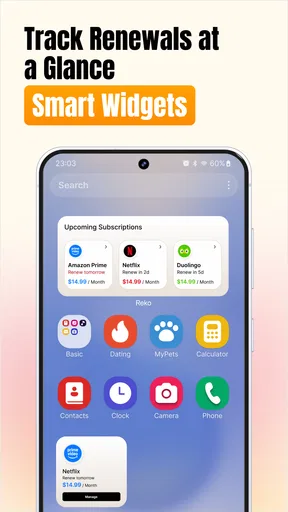
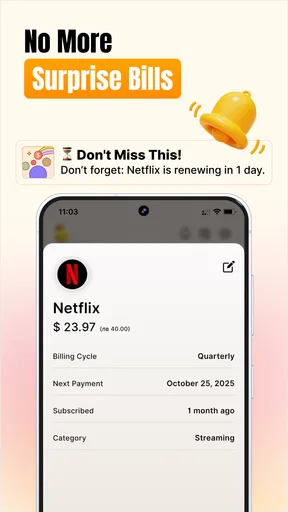

Our Review of Subscription Manager: Reko
 Analysis by Appyee
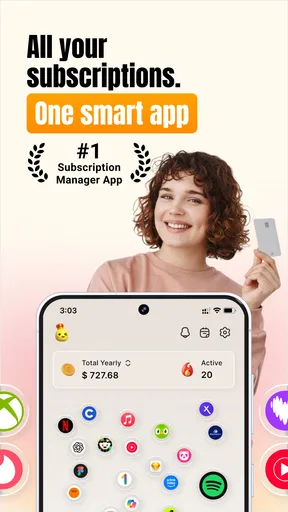
I approached Subscription Manager: Reko as a practical finance app rather than another tool I would open every day for entertainment. Its purpose is straightforward: help me keep track of recurring subscriptions, bills, renewals, and trials before they quietly turn into unwanted charges. That sounds simple, but subscription clutter is exactly the kind of problem that grows in the background until it becomes difficult to see where money is going.
Reko is free to install, with optional in-app purchases priced from $4.49 to $8.99 per item. It is made by Playground Studio LLC and is rated for Everyone, which makes its subject matter approachable for a broad audience. The app has a 4.2 average from around 275 ratings and has passed 10K+ installs, so it has attracted a modest but meaningful user base without feeling like an untested idea.
How Reko feels when managing recurring expenses
The strongest reason to try Reko is that it gives recurring payments a dedicated home. Instead of relying on memory, scattered email receipts, or a bank statement that I only inspect after money has left my account, I can use a subscription manager to create a clearer picture of upcoming commitments. That change in visibility is more useful than it may sound. The real value is not simply recording a service; it is making renewal dates noticeable early enough to act.
I found the app best suited to people who have accumulated several digital services over time. A music plan, cloud storage, video platform, fitness membership, productivity tool, and a few free trials can be easy to forget when each one renews on a different day. Reko’s focus on subscriptions, bills, renewals, and trials brings those separate obligations into one finance-oriented workflow.
The opening experience is likely to feel relatively direct because the app has a narrow job. It is not trying to replace a full banking application, investment dashboard, or detailed budgeting package. That narrower scope is an advantage when I only want to answer questions such as “What is due soon?” or “Which trial should I review before it renews?” A specialized tool can be less intimidating than a complete personal-finance suite.
At the same time, I would not treat it as an automatic solution to every recurring charge. A subscription tracker is only as useful as the information entered and maintained inside it. If I add a service with the wrong renewal timing, forget to update a canceled plan, or overlook a bill that never makes it into the app, the resulting view can still be misleading. Reko helps organize awareness; it does not remove the need for a quick check of the original provider or payment account.
Speed expectations and the first setup
For this kind of app, perceived speed matters less than clarity. I do not need complex screens to animate quickly; I need the list of financial commitments to appear without making me hunt through menus. Reko’s focused purpose gives it a sensible performance expectation: routine actions such as checking subscriptions or reviewing renewal details should feel lighter than using a broad financial platform packed with unrelated sections.
The first setup is the point where patience matters most. Building a useful list takes some effort, especially if I have never kept an inventory of recurring payments. I would begin with the services I know I use, then inspect recent bank or card activity for forgotten charges. This two-pass approach is better than trying to remember everything in one sitting. It also reduces the chance of creating a tidy but incomplete list.
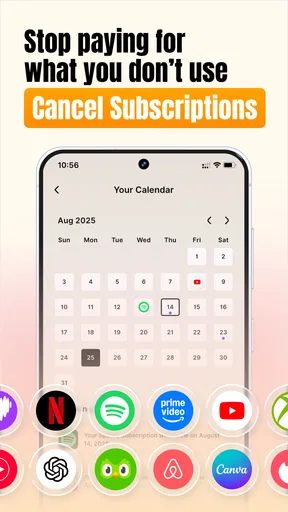
A practical tip is to add annual and irregular commitments alongside monthly ones. Monthly charges are easy to notice because they appear often, while annual renewals can cause the most surprise because they disappear from attention for long periods. Trials deserve similar treatment. Even when a trial costs nothing at the start, its renewal date is the important part, so I would record it as soon as I activate the offer rather than waiting until the last day.
Another useful workflow is to use Reko as a review queue rather than a passive archive. When I see an upcoming renewal, I can ask whether I used the service during the previous period, whether another service already covers the same need, and whether the plan still fits my budget. This turns the app from a list of expenses into a small monthly decision ritual.
What happens during heavier use
Reko becomes more valuable when the number of recurring commitments grows. With only one or two subscriptions, a note-taking app or calendar reminder may be enough. Once the list includes several payment cycles and trial deadlines, a dedicated finance category starts to make more sense. The heavier the list, the more important it becomes that I can scan it without confusing active services, upcoming renewals, and items I no longer use.
I would use it particularly during a household money review. For example, imagine I am preparing a monthly budget after noticing that the account balance is lower than expected. Instead of checking every merchant manually, I can review the recurring items I have recorded, identify charges that are close together, and decide which services need attention. If a family member also uses paid services, the same review can expose duplicate tools, such as two storage plans or overlapping entertainment memberships.
That scenario also reveals a trade-off. Reko can help me see recurring expenses together, but it should not be confused with a shared household ledger unless the app’s current workflow specifically suits that arrangement. I would keep responsibility clear: one person should verify whether a service is still active, while another should not assume that a listed subscription has already been canceled. A visual reminder is helpful, but confirmation from the provider remains the safest final step.
Heavy use can also mean repeated editing. Subscription prices, billing cycles, and trial status can change, and a tracker needs occasional maintenance. I would schedule a short review after receiving a renewal email or noticing a change on a card statement. That habit is more reliable than entering everything once and assuming the list will remain accurate forever.
The optional purchases are worth considering in that context. Since the app is free but offers items between $4.49 and $8.99, I would first test whether the basic workflow handles my own list comfortably. The right choice depends on whether the paid options remove a real irritation in my routine. Paying simply because an app is about subscriptions defeats the purpose of using it to control unnecessary spending.
Reliability, stability, and recovering from mistakes
Financial organization apps earn trust through consistency. I want the information I entered to remain understandable when I return later, and I want changes such as canceled services or updated renewal dates to be easy to reflect. Reko’s current version is 3.0.11, which suggests an actively maintained product line rather than a first experimental release, but version information alone is not a guarantee that every workflow will suit every device.
My main reliability advice is to treat the app as a planning aid and keep a second confirmation habit for important payments. When a renewal matters, I would verify it through the service’s account page, email receipt, or payment history before assuming that an entry in Reko represents the provider’s current status. This is not a criticism unique to Reko; it is a sensible boundary for any manually managed subscription tracker.
Recovery is especially important when I make an entry mistake. If I record the wrong date or mark a service incorrectly, the best response is to correct the item immediately rather than leaving a note to fix it later. Small errors become expensive when they affect a renewal review weeks afterward. I would also avoid deleting useful history too quickly. Keeping a clear distinction between a canceled service and one I never had can make later bank-statement checks easier.
There is a second recovery situation: returning to the app after ignoring it for a while. In that case, I would not trust the list blindly. I would compare the recorded subscriptions with recent financial activity, check which trials became paid plans, and update anything that changed. This reset process is more effective than adding new items on top of an outdated collection.
Stability also includes mental stability. An app that makes me feel overwhelmed by too many categories or warnings is less useful, even if it contains every possible finance feature. Reko’s focused subject gives it a chance to remain manageable. Its limitation is that users who want deep spending analysis, account aggregation, or a full budget system may eventually outgrow that focus and prefer a broader finance application.
Device limits and who should use it
Reko supports devices running Android 7.0 or later, so compatibility reaches back to older Android hardware. That is helpful if I am keeping an aging phone in service, although the experience can still vary depending on the device’s overall condition, available storage, background activity, and operating-system behavior. I would expect a newer phone to provide a smoother general experience, while an older handset may make any finance app feel less responsive during routine navigation.
The app’s Everyone age rating makes it approachable for general household use. Still, age suitability is not the same as financial suitability. A young user learning to monitor trial renewals may appreciate the simple purpose, while someone managing complex business expenses may need more detailed records than a subscription-focused app is designed to provide.
Reko is a good fit for someone who repeatedly forgets renewal dates, has several digital memberships, or wants a dedicated place to review recurring bills. It is also useful for people who dislike opening a full banking app just to answer a narrow question about upcoming commitments. The app can create a valuable pause between receiving a trial and allowing it to become a paid renewal.
I would skip it if my recurring expenses are already handled accurately by a calendar, spreadsheet, or financial app that I check consistently. I would also look elsewhere if I need automatic bank synchronization, advanced category reporting, investment tracking, or detailed shared budgeting. Those needs belong to a broader tool, and forcing Reko to act like one would create unnecessary friction.
How it compares with familiar alternatives
The simplest alternative is a calendar. A calendar reminder can be excellent for one annual renewal or an important trial, and it may require less setup. Its weakness is that it does not naturally present the whole recurring-expense picture. Reko is more appropriate when I want to review several subscriptions together rather than receive isolated alerts on separate dates.
A spreadsheet offers more flexibility. I can add columns for owner, payment method, cancellation status, renewal timing, and notes. For someone comfortable maintaining formulas and filters, that may be the stronger option. Reko’s advantage is convenience and a finance-specific purpose; its disadvantage is that it may not satisfy a user who wants to design a highly customized tracking system.
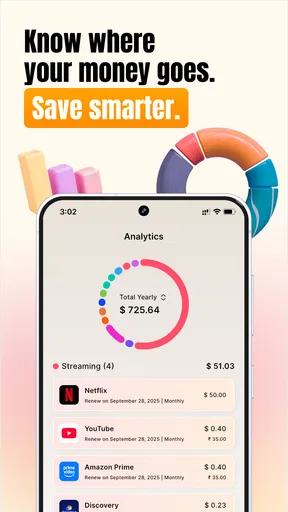
Banking apps and full budgeting platforms can provide a more complete view of spending, especially when they connect transactions to accounts. They are better choices when I need to analyze income, debt, savings, and everyday purchases in one place. Reko is more appealing when the problem is narrower: recurring commitments are scattered, and I want a focused tool for bringing them into view without taking on a complete budgeting project.
The most effective setup may combine tools rather than choosing only one. I could use Reko for the subscription inventory, my bank app for confirming actual charges, and a calendar for a particularly important cancellation deadline. That division of labor avoids expecting one application to be perfect at every part of financial organization.
My performance verdict
After looking at its purpose, setup demands, heavier-use scenarios, and device reach, I see Reko as a focused companion for subscription awareness. Its likely strength is not advanced financial analysis but the simple act of making recurring obligations visible enough to review. That can save money indirectly by helping me notice forgotten trials, duplicate services, and renewals that no longer deserve a place in my budget.
The app’s free entry point makes it easy to test without committing immediately, while the optional purchases mean I should judge the paid value against a real need rather than unlock everything automatically. I would begin with a careful inventory, use it for a few renewal cycles, and then decide whether it has become part of my routine.
My recommendation is clear: choose Reko if recurring subscriptions are the blind spot in your personal finances, but choose a full budgeting tool if you need a complete account-level picture. It is not a replacement for checking providers or bank statements, and it will not make an inaccurate list accurate by itself. Used as a deliberate review point, however, it offers a practical way to regain control over the small recurring charges that are easiest to overlook.
For me, the deciding question is not whether I have many subscriptions, but whether I regularly remember them at the right time. If the answer is no, this finance app is worth trying. If I already have a reliable system and rarely miss a renewal, its focused approach may add another layer instead of removing one. That makes Reko a useful specialist rather than a universal money manager, and that distinction is exactly what potential users should understand before installing it.
Verdict
Strengths of Subscription Manager: Reko
- Tracks recurring payments and renewal dates in one place.
- Custom reminders help prevent unexpected subscription charges.
- Supports budgeting by showing upcoming and recurring expenses.
- Clean interface makes adding and reviewing subscriptions straightforward.
- Useful for spotting forgotten or rarely used memberships.
Limitations of Subscription Manager: Reko
- Manual entry can be time-consuming when managing many subscriptions.
- Some advanced features may require a paid plan or in-app purchase.
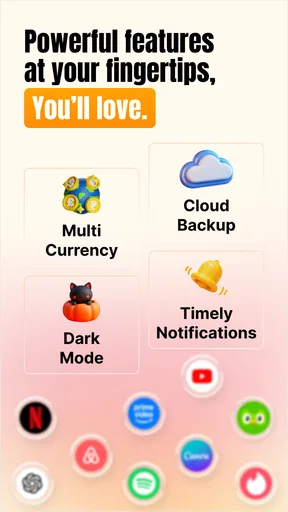
- Currency and regional support may vary depending on your location.
- It may not automatically detect every subscription from your accounts.
- Reminder accuracy depends on keeping prices and billing dates updated.
Similar Picks in This Category
View All
Google Wallet
Google LLC4.3

Airtel: Recharge, Bank & Loans
Airtel4.0

PayPal - Pay, Send, Save
PayPal Mobile4.2

DANA Indonesia Digital Wallet
PT Espay Debit Indonesia Koe4.5

Binance: Buy Bitcoin & Crypto
Binance Inc.4.8

Cash App
Block, Inc.4.7
Frequently Asked Questions
What is Subscription Manager: Reko used for?
Subscription Manager: Reko is designed to help you organize and monitor recurring payments in one place. You can record services such as streaming platforms, mobile plans, software, memberships, and other subscriptions, then review their prices, billing cycles, and renewal dates. It can be useful for identifying forgotten services and gaining a clearer picture of your regular monthly or yearly spending.
Does Subscription Manager: Reko automatically detect all of my subscriptions?
You should not assume that every subscription will be detected automatically. In many cases, the app works best when you manually add the services you use and enter details such as the cost, currency, payment frequency, and renewal date. Depending on the version and device, some features may support reminders or account-related integration, but you should review the information carefully because automatic detection may not cover every provider or payment method.
Can Reko remind me before a subscription renews?
One of the main reasons to use a subscription manager is to receive advance notifications about upcoming renewals, and Reko is intended to help with that organization. After adding a subscription correctly, you can generally use its renewal date and reminder options to avoid unexpected charges. Make sure notifications are enabled in both the app and your phone’s system settings, and verify dates after changing billing plans.
Is Subscription Manager: Reko free to download and use?
The availability of free features, premium tools, advertisements, or in-app purchases can depend on the current app version and the platform where you download it. Before installing, check the official store listing for the latest pricing information and subscription terms. A free download does not always mean that every feature is included, so review trial periods, recurring charges, and cancellation conditions before activating any paid option.
Is my financial information safe when using Subscription Manager: Reko?
A subscription organizer may require details about services, prices, billing dates, and possibly account-related information, so privacy should be considered before use. Avoid entering passwords, card numbers, or other sensitive payment credentials unless the official documentation clearly explains why they are needed. Read Reko’s privacy policy, check its requested permissions, and use only official download sources to reduce security and data-protection risks.
